Metaplanet’s Executive Stock Pool Sparks Shareholder Backlash, CEO Addresses MMXX Ties

Reclaim gigabytes from Google Drive, Gmail, and Photos in just a few minutes
- Investment Opportunities Markets
 Peter Lynch
- 3 minutes read
Few automated emails trigger a micro-headache quite like the dreaded cloud storage warning: “Your storage is 95 percent full. Upgrade now or risk losing access to everything you hold dear.”
The natural impulse is to hand over your credit card for the next storage tier. It costs a couple of bucks a month, it solves the immediate problem, and you can get back to work.
But doing that is the digital equivalent of renting a bigger storage unit because you refuse to throw away empty cardboard boxes.
Before you commit to another monthly subscription fee, spend a few minutes running this targeted purge across Google Drive, Gmail, and Photos.
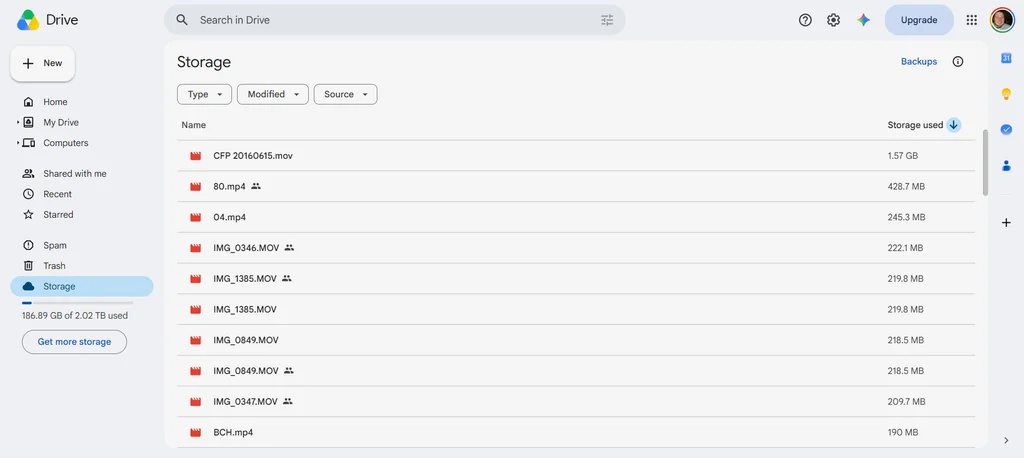
Force Google to rank your files by size
Skip digging through individual subfolders. Instead, open your browser and navigate directly to drive.google.com/drive/u/0/quota.
This hidden view bypasses your folder structure and lists every single file in your storage pool in descending order of size. Delete any oversized files you no longer need, and you’ll likely recover a ton of storage immediately.
Flush Gmail’s heavy attachments
Old emails with large attachments are massive storage hogs. Head to the Gmail search bar and paste this exact operator: has:attachment larger:10M.
investment News
gmail,google,Google Photos

